ZippyScore
ZippyScore is a proprietary rating based on 6 criteria: performance, portability, display, battery, value, and connectivity.
See rating criteria
- Performance: CPU / GPU performance
- Portability: Screen size & weight
- Display: Panel type, aspect ratio & refresh rate
- Battery: Rated battery life
- Value: Specs-to-price balance
- Connectivity: Port types & count
Pros & Cons
Pros
- 16GB of memory keeps things running smoothly when you juggle several apps at once
- USB-A, HDMI and Ethernet are all built in, so no dongles required
- Face and fingerprint unlock make logging in quick and painless
- Wi-Fi 6E support keeps calls and work sessions on a stable connection
Cons
- At 1477 g (3.26 lbs) it's a bit heavy for a 14-incher → look at lighter machines if you carry one all day
- No keyboard backlight → barely an issue in a well-lit office
- Not much muscle for heavy or demanding workloads → plenty if your day is desk work
Specs Summary
| OS | Windows 11 Pro |
|---|---|
| CPU | AMD Ryzen AI 5 430 (PassMark: 13,437) |
| RAM | 16GB |
| Storage | 512GB |
| Display | 14" IPS (Anti-glare) 1920x1200 (16:10) |
| Weight | 1.54 kg (3.40 lbs) |
| Ports | USB-C × 2 (10Gbps/PD/Video out), USB-A × 2 (5Gbps), HDMI × 1 (ver.2.1), Ethernet (RJ-45) × 1, Headphone jack × 1 |
| GPU | AMD Radeon 840M (G3D Mark: 3,805) |
| Biometrics | Fingerprint |
| Battery | Up to 7.5 h (Capacity: 56 Wh) |
| Camera | 5.0 MP |
| Dimensions | Approx. 318.60 × 224.30 × 20.40 mm (W × D × H) |
| Wi-Fi | Wi-Fi 6E |
| Bluetooth | Bluetooth 5.3 |
| Color | Pike silver aluminum / Pike Silver |
Configurations vary by retailer, region, and availability.
Hands-on Review
Alright, here's my hands-on take on the ProBook 4 G2a 14 AI PC. The unit I tested was configured like this:
| Spec | Review unit |
|---|---|
| CPU | AMD Ryzen AI 5 430 |
| Memory | 16GB |
| Storage | 512GB SSD |
| Display | 14-inch (1920x1200) |
| Graphics | AMD Radeon Graphics |
Configurations can differ depending on when and where you buy.
Design
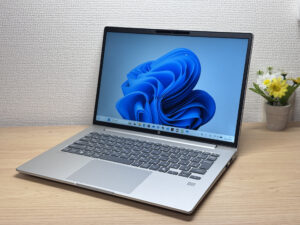
Starting with the design. The color is a calm silver, and it's the kind of laptop you can set down in any office without it looking out of place — classic business design, basically. There's none of the attitude you get from a consumer creator machine; it's a uniform, deliberately unremarkable build meant for offices deploying these by the dozen. The material doesn't pick up fingerprints, so hauling it around and pawing at it all day doesn't leave visible smudges, which is a small thing I really appreciate.
 Silver, classic, office-ready — this is what a business laptop looks like!
 The finish resists fingerprints, so it never feels greasy under your hands
It isn't ultra-thin by 14-inch standards, but it never reads as chunky either — the balance lands in a nice spot. It slides into a bag easily, and you get the sense someone actually thought this part through.
 Not too thin, not too thick — it slips right into a bag!
The lid carries a mirror-finished HP logo, and that bit of gloss gives the whole thing a sharp, tidy look. On consumer laptops a logo can end up shouting at you, but this one keeps the mirror finish classy instead of loud, which feels right for a business machine.
 The mirror-finish HP logo pulls the lid together!
 Just enough gloss to look sharp without showing off!
The bottom panel keeps the number of visible screw holes low, which I like. The rubber feet run along the top and bottom edges and hold the chassis in place, so nothing shifts around while you're typing.
 Few screw holes and solid rubber feet — no sliding around!
About opening the lid: the chassis lifts up with it now and then (the 16-inch model I reviewed earlier did the same thing). That said, the notch gives your finger a good grip, and if you hold the base down with one hand it opens smoothly, so it's basically a non-issue in practice.
 The notch gives you a good grip — one hand is enough!
 Hold the base and the hinge feels rock solid!
The hinge goes all the way to 180 degrees, the usual business-laptop move, so you can flip the screen around to show someone in a meeting — though of course they're looking at it upside down, so how useful that really is, I'm not sure.
 180 degrees flat, handy for showing people in meetings (maybe?)
Portability
Next up, portability. On my scale the chassis came in at 1477 g (3.26 lbs). Having reviewed a whole lot of 14-inch laptops, honestly that feels a little heavy for the class. Once you're up in the high 1.4 kg range, I start wishing they'd pushed harder on the weight.
 1477 g (3.26 lbs) measured — a bit heavy for a 14-incher…
The bundled charger, on the other hand, is remarkably light at 162.5 g (5.7 oz). It's a compact 65W USB-C brick with folding AC prongs, and it's about as light as the small third-party USB-C chargers I normally carry, which earns it real points from me. The chassis may be on the heavy side, but the featherweight charger claws back a good chunk of your total carry weight.
 162.5 g (5.7 oz) — as light as a compact third-party USB-C charger!
 Folding prongs keep it compact — it won't hog space in your bag!
Picking it up one-handed, those 1477 g do make themselves felt after a moment. Still, it's within the normal range for a 14-inch machine, and for everyday carrying it's perfectly livable.
 A little hefty one-handed, but nothing unusual for the class!
Display quality
On to the display. It's a 1920×1200 IPS panel, and the color output is good — standard for IPS, but solidly so. You're not getting OLED-deep blacks here, but for office work the color reproduction is more than enough, and I came away happy with it.
 Colorful photos come through vivid and clean!
 Fruit tones look natural — honest IPS color!
 Way more color than office work asks for!
Viewing angles are excellent — the colors barely shift when you look at it from the side. That pays off when several people crowd around the screen in a meeting and nobody sees a washed-out picture.
 No color shift off-axis, so group meetings are covered!
The aspect ratio is 16:10, and next to a 16:9 panel you can see the extra vertical space instantly. Same web page, fewer scrolls, less mousing around — it's a simple thing that just makes you more efficient.
 16:10 shows its extra height at a glance — less scrolling, more comfort!
It's also a matte (non-glare) panel, so reflections stay minimal. Offices are full of overhead fluorescents, and not fighting glare all day means less eye strain on long sessions.
 Matte finish keeps reflections down — easier on the eyes over a long day!
Keyboard
Next, the keyboard. The layout is properly designed, with no cramped keys anywhere — everything sits where it should.
 Clean layout with no awkwardly squeezed keys!
The one real letdown is that there's no keyboard backlight. Working in a dark room isn't this machine's strength, though most offices are lit up like a supermarket, so in practice it may not bite you much. Read it as a cost decision and it makes sense.
 No backlight, so visibility in the dark is rough…
Typing feel is simple and straightforward. The keycaps themselves feel a little plasticky, but the chassis is stiff enough that the whole thing stays planted while you type. Combined with the tidy layout, it's an easy keyboard to write on.
 A rigid chassis means no flex and steady typing!
 Simple feel, tidy layout — comfortable to write on!
Heads-up: these photos are the Japan-market unit, so the keyboard shown is the Japanese layout. US models ship with the standard US (ANSI) layout.
Touchpad
On to the touchpad. It's large relative to the keyboard area, and the basics feel great. At this size you can work mouse-free on your lap — on a plane, on a train, wherever, which is a nice bonus.
 Big surface makes lap use easy!
Gestures work reliably too, close to the feel you get on a MacBook. It's standard Windows functionality, but the extra surface area makes it genuinely pleasant.
 MacBook-adjacent feel, with gestures that respond instantly!
Performance
Now for CPU performance and the rest of it. PCMark 10 came back at 5148, which struck me as a little underwhelming.
 PCMark 10 at 5148 — I was hoping for a bit more!
| Total Score | Rating | What it feels like in real use |
|---|---|---|
| ~4,000 | Bare minimum | Web browsing and simple tasks work, but multitasking or many tabs feels sluggish. |
| 4,000–5,000 | Light use | Daily tasks are doable, but running multiple apps means waiting around. |
| 5,000–6,500 | Comfortable (mainstream) This PC | Handles most work without stress — fine for office, school, video calls. |
| 6,500–8,000 | High performance | Plenty of headroom. Light photo editing and programming feel snappy. |
| 8,000+ | Very high performance | Tackles video editing and heavy workloads. Long-lasting performance. |
*PCMark 10 reflects overall comfort. Actual feel depends on CPU, RAM, and SSD speed.
My loaner runs a Ryzen AI 5 430, so it's not a Ryzen AI 7 — plenty for regular desk work, but not the chip for heavy lifting. For a business laptop aimed at office tasks, though, the performance is a total non-issue. Cinebench 2026 multi-thread landed at 1058 pts, right around average, which handles ordinary office work comfortably.
 Cinebench 2026 multi at 1058 pts — enough for desk work!
| Score | Rating | What it feels like in real use |
|---|---|---|
| Up to 1,000 | Bare minimum | Light tasks work, but heavier processing or multitasking feels constrained. |
| 1,000–2,000 | Standard (power-efficient) This PC | Handles daily tasks, but heavier loads create waiting. |
| 2,000–3,000 | Comfortable (mainstream) | Office, school, video calls all work comfortably. Plenty for most users. |
| 3,000–4,000 | High performance | Comfortable for multitasking, light/medium editing, and dev work. |
| 4,000+ | Very high performance | Handles video editing and heavy workloads with room to spare. |
*Cinebench 2026 is the latest CPU multi-core benchmark. Scores trend lower than R23, so direct comparison isn't valid.
On the GPU side, 3DMark Steel Nomad Light came in at 1076, which is on the light side. I doubt anyone is buying this to game on, but as a measure of video encoding and general screen-drawing muscle, it's about standard.
 3DMark at 1076 — built for everyday rendering, not gaming!
| Score | Rating | What it feels like in real use |
|---|---|---|
| Up to 400 | Bare minimum | 3D performance is quite limited. Not really suited for gaming. |
| 400–900 | Light 3D | Lighter games and low-load 3D processing work. |
| 900–1,500 | Average (mainstream) This PC | Standard for integrated GPUs. Light to medium games playable with right settings. |
| 1,500–2,200 | High performance | Strong for an integrated GPU. Games and 3D work feel comfortable. |
| 2,200+ | Very high performance | Top-tier 3D performance for thin laptops. Real graphics headroom. |
*3DMark Steel Nomad Light targets thin laptops and integrated GPUs. Score range differs from Time Spy, so direct comparison isn't valid.
What did catch my eye was storage speed in CrystalDiskMark: 1990 MB/s read and 2485 MB/s write. That's slowish next to recent laptops, but stacked against the 500–600 MB/s you'd get from a hard drive it's still plenty quick, and nothing you'd notice day to day.
 1990 MB/s read, 2485 MB/s write — a step behind the newest machines…
| Score | Rating | What it feels like in real use |
|---|---|---|
| Up to 600 MB/s | Bare minimum | Faster than HDD, but slow for modern SSDs. App launches feel slightly slow. |
| 600–1,500 MB/s | Average | Fine for daily use, though loading is noticeably slower than top-tier SSDs. |
| 1,500–3,500 MB/s | Comfortable (mainstream) This PC | App launches and file loading feel smooth. No real complaints in daily use. |
| 3,500–5,500 MB/s | Fast | Loads large data and apps quickly. Definitely upper-tier SSD speed. |
| 5,500+ MB/s | Very fast | High-end NVMe territory. Heavy data work without waiting. |
*CrystalDiskMark measures SSD speed. It mainly affects app launch and file loading speed, not overall PC performance.
Battery life
Next, battery life.
Battery rating: average
The battery is 56Wh, and with a 14-inch screen the power draw isn't especially high. For a few hours of office use you can comfortably leave the charger behind. If you're out for a full day, though, I'd toss the charger in your bag just in case.
 Checking battery health — capacity sits right around the rated 56Wh!
Fan noise and heat
Now for fan noise and heat. At idle I measured 19.9 dB, essentially silent, and light work never spins the fan up at all.
 19.9 dB at idle — near silent and stress-free!
Put the CPU under load and it climbs to 38.6 dB, still short of the 40 dB mark, which tells me the cooling is well tuned. It matches what I saw on the 16-inch model, and you can feel that this is a business machine built with some care.
 38.6 dB under load — the cooling never breaks the 40 dB wall!
| Noise Level | Rating | Feel |
|---|---|---|
| Under 30 dB | Near-silent Idle | Fan noise is barely perceptible — library-quiet and ideal for focused work. |
| 30–35 dB | Quiet | Faintly audible but non-distracting. Easy to work in a quiet room. |
| 35–40 dB | Noticeable Load | You can tell the fan is spinning, but it rarely interrupts work. |
| 40–45 dB | Somewhat loud | Can become distracting in quiet environments. Headphones start to help. |
| 45–50 dB | Loud | Noticeable stress over extended use. Cooling is clearly prioritized. |
| 50 dB+ | Very loud | Prominent fan noise under load — gaming/high-performance thermal design. |
The exhaust vents sit at the back of the chassis, so even with a mouse beside it and your hand resting there, you're unlikely to catch a stream of hot air.
 Rear-facing exhaust keeps hot air away from your hands!
Ports
On to connectivity. The left side lines up HDMI, USB-A, two USB-C ports and a headphone jack.
 A built-in Ethernet jack means no hub, and the Kensington slot covers theft!
The right side gets a Kensington lock slot, an Ethernet port and USB-A. Being able to plug Ethernet straight in matters more than it sounds — you get a stable wired connection without dragging a USB-C hub around, which is exactly the sort of thing a business machine should do. The Kensington slot is reassuring on the theft-prevention side too. Plenty of recent laptops skip it, so having it here is a genuine plus for office use.
 The left side balances USB-A, two USB-C and a headphone jack!
There's a full-size HDMI port as well, so you can walk into a meeting room, plug in a cable and put your screen on the wall.
 Built-in HDMI means one cable gets you connected in any meeting room!
The USB-C ports on the left also carry video out, and when I hooked up external displays I got three screens running in total, counting the built-in one. Pair it with an external keyboard and mouse at your desk and it works like a desktop, which is a real jump in productivity.
 One more screen over USB-C — three displays in total!
Webcam
Next, the webcam. It's a 5MP sensor, and shooting with the stock Windows Camera app the extra resolution shows — images come out clean.
 5MP pulls in fine detail, crisp and clear!
There's also a physical privacy shutter as standard, so when you don't want to be on camera during a call you just slide it shut. Even if the machine got hacked, a closed shutter means no video is going anywhere, which security-conscious companies will appreciate.
 Slide the shutter and the camera is physically off — that's peace of mind!
Speakers
Next, the speakers. I put on a movie on Amazon Prime Video to see how they hold up.
 Testing with an actual movie on Prime Video!
They aren't the type to hit you with deep bass; the tuning favors clear mids, which is exactly what you want for voices on a video call. The drivers sit toward the front of the underside, so the sound carries forward to you.
 Front-firing placement makes voices easy to follow on calls!
Security
Now for security. There's an IR camera for face unlock, plus fingerprint recognition as standard.
 Face unlock through the IR camera — quick and clean!
Add the passcode and you have three ways in: face, fingerprint or PIN, so you can pick whichever suits the moment.
 The fingerprint reader responds instantly — three unlock options is reassuring!
Price
And then the important part, price. List price runs a little high, but with promotions you can often land it around $1,409.00. Given Windows 11 Pro, a Ryzen AI 5 400-series chip and 16GB of memory as the starting point, the value works out nicely for a bulk rollout.
Final thoughts
It's aimed at business, but remote workers and sole proprietors will find it easy to live with too. Performance and storage speed don't stand out, but the essentials for office work — a wide-angle display, a built-in Ethernet jack, triple authentication — are all handled. I'd say it's a great match for anyone doing team-based office work who wants something dependable rather than flashy.
A classic business laptop that disappears into the office in the best way!
Where to Buy
* Prices may vary. Please check each store for the latest price and availability.
About the author