ZippyScore
ZippyScore is a proprietary rating based on 6 criteria: performance, portability, display, battery, value, and connectivity.
See rating criteria
- Performance: CPU / GPU performance
- Portability: Screen size & weight
- Display: Panel type, aspect ratio & refresh rate
- Battery: Rated battery life
- Value: Specs-to-price balance
- Connectivity: Port types & count
Pros & Cons
Pros
- A generous ~60Wh battery means you're not glued to an outlet
- USB-C, USB-A, HDMI, and a headphone jack — no dongles required
- A Gen 4 SSD delivers blazing 7047 MB/s read speeds
- Nearly silent at idle, and load noise tops out around a modest 35.5 dB
- A privacy shutter on an entry-level machine gives peace of mind on video calls
Cons
- Actual weight lands around 1.5 kg (~3.3 lbs), heavier than spec → worth considering a lighter machine if you carry it daily
- No backlight makes it hard to see keys in the dark → a non-issue in well-lit rooms
- Not built for heavy gaming or serious video editing → fine if you stick to lighter tasks
Specs Summary
| OS | Windows 11 Home |
|---|---|
| CPU | AMD Ryzen 5 40 (PassMark: 9,341) AMD Ryzen 5 230 (PassMark: 19,428) |
| RAM | 8GB |
| Storage | 256GB / 512GB |
| Display | 14" IPS (Anti-glare) 1920x1200 (16:10) |
| Weight | 1.42 kg (3.13 lbs) |
| Ports | USB-C × 2 (10Gbps/PD/Video out), USB-A × 2 (5Gbps), HDMI × 1 (ver.2.1), Headphone jack × 1 |
| GPU | AMD Radeon 610M (G3D Mark: 1,321) AMD Radeon 760M (G3D Mark: 5,373) |
| Biometrics | Face Recognition |
| Battery | Up to 12 h (Capacity: 41 Wh) |
| Camera | 2.1 MP |
| Dimensions | Approx. 315 × 226 × 14.8 mm (W × D × H) |
| Wi-Fi | Wi-Fi 6 |
| Bluetooth | Bluetooth 5.4 |
| Color | Mica Silver and Iron Gray |
Configurations vary by retailer, region, and availability.
Hands-on Review
それでは、OmniBook 3 14-hy/hwの実機レビューを見ていきます。今回レビューで使用したのは、以下の構成です。
| Item | Review Unit Config |
|---|---|
| CPU | AMD Ryzen 5 230 |
| Memory | 16GB |
| Storage | 512GB SSD |
| Display | 14-inch IPS (1920 x 1200) |
| Graphics | AMD Radeon 760M |
| Color | Mica Silver |
*Specs may vary depending on when and where you buy it.
Design
Let's start with the design.
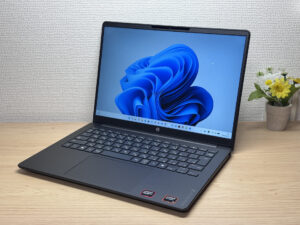
The color I've got here is called Mica Silver, but in person it reads as almost pure black. The build feels way sturdier than I'd expect from an entry-level machine, and the overall fit and finish looks good too. The "OmniBook 3" logo on the palm rest is just printed rather than the glossy metal badge you'd get on higher-end models — that's one spot where you can tell they trimmed costs.
 The all-black front design of the OmniBook 3 14-hy/hw looks sharp and put-together
 A subtle OMNIBOOK 3 logo sits on the palm rest
Flip it around and the impression changes completely. The HP logo on the lid has a mirror finish that catches the light nicely. Little touches like that are more polished than I expected, and it was a pleasant surprise.
 Catch it at an angle and the mirrored HP logo really shines ✨
 The matte lid finish also does a nice job of hiding fingerprints
At 14.8mm thick, it's not the slimmest laptop out there, but it still slides into a bag without any fuss.
 At 14.8mm thick, it slides right into a bag
The rubber feet on the bottom are firm enough that the laptop never slid around while I was typing. You can also spot one of the cooling fan's intake vents down here.
 Solid rubber feet keep the laptop from sliding around while typing
The hinge left a good impression too — you can pop it open with one hand. A lot of entry-level laptops have flimsy hinges that need two hands to open, so this is a nice, if small, win. It doesn't swing all the way to 180 degrees, but it stops at an angle that's plenty for everyday use.
 A quality hinge you can pop open with one hand
 A finger notch on the lid makes it easy to open
 It doesn't hit a full 180 degrees, but that's plenty for everyday use
Portability
Next, let's talk about portability.
The spec sheet lists 1.42 kg (~3.1 lbs), but on my scale it came out to 1,497 g (~3.3 lbs) — a bit heavier than advertised 😅. If you're planning to carry this around daily, that gap might be worth noting.
 Measured weight came in at 1,497 g (~3.3 lbs), a bit over spec
The stock charger weighed in at 351.5 g (~0.8 lbs) on my scale too, which is on the heavier side. The fix is simple, though: this laptop charges over USB-C, so swapping in a compact USB-C charger cuts down the carry weight significantly. I'd just leave the stock charger at home or the office as a dedicated dock.
 The stock charger weighed 351.5 g (~0.8 lbs), on the heavier side
 Swap in a compact USB-C charger and it gets a lot easier to carry
Pick it up with one hand and you definitely feel that it's pushing 1.5 kg (~3.3 lbs). That said, it's still perfectly manageable tossed in a backpack for class or your commute.
 You can feel the weight when holding it one-handed
Display Quality
Next up, display quality.
It's an IPS panel with decent color output. Even at an angle, colors barely shift — that classic IPS stability holds up. That said, compared to the latest OLED panels, blacks don't go quite as deep and look a touch washed out by comparison. If you're doing serious photo or video editing, you'll want to look at a model with a step-up display.
 Vibrant colors on this IPS panel make photos pop
 Color reproduction like this is more than enough for a beginner-friendly machine
 Barely any color shift even viewed from an angle
The aspect ratio is 16:10 at 1920 x 1200, and thanks to slim bezels, the 14-inch body still feels roomy to work in. Line it up next to a 16:9 panel and the difference in how often you need to scroll is obvious.
 Being 16:10 means you get noticeably more screen real estate on the same page!
The panel is matte, so glare from fluorescent lighting stays minimal and the screen stays easy to read.
 A matte finish keeps fluorescent glare from being distracting
Keyboard
Let's talk about how the keyboard feels to type on.
It's a standard tenkey-less layout, and since HP tuned this for the Japanese market, it types cleanly with nothing weird going on.
 A no-frills standard Japanese keyboard layout
Typing on it for real, I'll be honest — the keycaps feel pretty plasticky. That's a minor knock from me. But the chassis is rigid enough that the deck never flexes or shifts while you're typing, and the actual feel of each keystroke was satisfying. Unless you've spent a lot of time on higher-end keyboards, the cheap-feeling keycaps probably won't bother you much.
 Stable typing even for coding sessions
 A rigid chassis keeps flex to a minimum while typing
The one letdown is the lack of a backlight. In a dark room, you basically can't see the key legends. Cranking up the screen brightness helps a bit, but it can get glare-y, so if you do a lot of work in dim rooms, this might be a dealbreaker.
 No backlight makes the keys hard to see in low light
Heads-up: these photos are the Japan-market unit, so the keyboard shown is the Japanese layout. US models ship with the standard US (ANSI) layout.
Trackpad
Next, how the trackpad handles.
It's sized generously relative to the keyboard, and it tracks smoothly enough for comfortable everyday use.
 A generously sized trackpad with smooth tracking
It handles gestures well too — pulling up the window overview works without a hitch. For an entry-level machine, this trackpad is putting in real effort.
 Gestures pull up the window overview smoothly
Performance
Let's check out performance.
This review unit runs an AMD Ryzen 5 230 with 16GB of memory and AMD Radeon 760M graphics. It scored 6593 on PCMark 10, which is a genuinely solid number for an entry-level CPU. Excel, web browsing, video streaming — all of that runs smoothly.
 PCMark 10 scored 6593, well above what you'd expect from an entry-level chip
| Total Score | Rating | What it feels like in real use |
|---|---|---|
| ~4,000 | Bare minimum | Web browsing and simple tasks work, but multitasking or many tabs feels sluggish. |
| 4,000–5,000 | Light use | Daily tasks are doable, but running multiple apps means waiting around. |
| 5,000–6,500 | Comfortable (mainstream) | Handles most work without stress — fine for office, school, video calls. |
| 6,500–8,000 | High performance This PC | Plenty of headroom. Light photo editing and programming feel snappy. |
| 8,000+ | Very high performance | Tackles video editing and heavy workloads. Long-lasting performance. |
*PCMark 10 reflects overall comfort. Actual feel depends on CPU, RAM, and SSD speed.
Cinebench 2026's multi-core score also came in at 1843 points, clearing the bar for a solid standard performer.
 Cinebench 2026 multi-core score landed at 1843 points
| Score | Rating | What it feels like in real use |
|---|---|---|
| Up to 1,000 | Bare minimum | Light tasks work, but heavier processing or multitasking feels constrained. |
| 1,000–2,000 | Standard (power-efficient) This PC | Handles daily tasks, but heavier loads create waiting. |
| 2,000–3,000 | Comfortable (mainstream) | Office, school, video calls all work comfortably. Plenty for most users. |
| 3,000–4,000 | High performance | Comfortable for multitasking, light/medium editing, and dev work. |
| 4,000+ | Very high performance | Handles video editing and heavy workloads with room to spare. |
*Cinebench 2026 is the latest CPU multi-core benchmark. Scores trend lower than R23, so direct comparison isn't valid.
The GPU is the integrated AMD Radeon 760M, which put up a 1412 in 3DMark Steel Nomad Light. Light gaming is doable, but anything demanding is going to struggle. That's about what you'd expect at this price point.
 3DMark Steel Nomad Light scored 1412 — light gaming is realistic, not much more
| Score | Rating | What it feels like in real use |
|---|---|---|
| Up to 400 | Bare minimum | 3D performance is quite limited. Not really suited for gaming. |
| 400–900 | Light 3D | Lighter games and low-load 3D processing work. |
| 900–1,500 | Average (mainstream) This PC | Standard for integrated GPUs. Light to medium games playable with right settings. |
| 1,500–2,200 | High performance | Strong for an integrated GPU. Games and 3D work feel comfortable. |
| 2,200+ | Very high performance | Top-tier 3D performance for thin laptops. Real graphics headroom. |
*3DMark Steel Nomad Light targets thin laptops and integrated GPUs. Score range differs from Time Spy, so direct comparison isn't valid.
Storage speed is the real standout here. CrystalDiskMark measured 7047 MB/s sequential read and 5571 MB/s write — this thing is running a genuinely fast SSD. It's a Gen 4 drive, and it shows: file reads and writes were essentially stress-free.
 A 7047 MB/s read speed is wild for this price bracket
| Score | Rating | What it feels like in real use |
|---|---|---|
| Up to 600 MB/s | Bare minimum | Faster than HDD, but slow for modern SSDs. App launches feel slightly slow. |
| 600–1,500 MB/s | Average | Fine for daily use, though loading is noticeably slower than top-tier SSDs. |
| 1,500–3,500 MB/s | Comfortable (mainstream) | App launches and file loading feel smooth. No real complaints in daily use. |
| 3,500–5,500 MB/s | Fast | Loads large data and apps quickly. Definitely upper-tier SSD speed. |
| 5,500+ MB/s | Very fast This PC | High-end NVMe territory. Heavy data work without waiting. |
*CrystalDiskMark measures SSD speed. It mainly affects app launch and file loading speed, not overall PC performance.
Battery Life
Battery rating: Above average
Measured capacity comes out to roughly 60Wh, which is generous for this price bracket. Unlike a lot of entry-level machines, HP didn't cut the battery to save cost here, and that's a genuinely good sign. HP quotes around 12 hours, but push the brightness up or stream video for a while and that number drops faster — getting through a full day without a charger nearby might be cutting it close in some cases. Since it charges over USB-C PD, keeping a small USB-C charger in your bag is a smart move.
 Checking the battery health — plenty of capacity to spare
Fan Noise & Heat
Let's check the fan noise and heat, since that's always a concern.
At idle, I measured 17.4 dB — basically silent. For light everyday tasks, you're not going to notice the fan at all.
 17.4 dB at idle — nearly silent
Even under CPU load, it stayed around 35.5 dB, which never felt intrusive to me. Cooling performance here is genuinely solid.
 Even under heavy load, noise stays around 35.5 dB
| Noise Level | Rating | Feel |
|---|---|---|
| Under 30 dB | Near-silent Idle | Fan noise is barely perceptible — library-quiet and ideal for focused work. |
| 30–35 dB | Quiet | Faintly audible but non-distracting. Easy to work in a quiet room. |
| 35–40 dB | Noticeable Load | You can tell the fan is spinning, but it rarely interrupts work. |
| 40–45 dB | Somewhat loud | Can become distracting in quiet environments. Headphones start to help. |
| 45–50 dB | Loud | Noticeable stress over extended use. Cooling is clearly prioritized. |
| 50 dB+ | Very loud | Prominent fan noise under load — gaming/high-performance thermal design. |
Exhaust vents out the back, so there's nothing blowing hot air onto your hands from the sides while you type. That's a small detail, but it makes a real difference.
 Rear exhaust keeps hot air away from your hands
Ports & Expansion
Let's look at the ports and expansion options.
Checking both sides, you get two USB-C ports (video out + PD charging), two USB-A ports, HDMI, and even a headphone jack — a genuinely well-rounded lineup. Headphone jacks keep disappearing lately, so having one here is a nice touch.
 A well-stocked side with USB-C, USB-A, and HDMI
 No dongles needed — everything plugs in directly
Hooking it up to my 4K monitor over HDMI, it drove it cleanly at 60Hz. Add an external monitor at home or the office and you can seriously boost your workflow 😉.
 A 4K monitor over HDMI displayed perfectly
I also tried adding two more 4K monitors over USB-C, and combined with the built-in display, it handled a full three-screen setup. That's impressive expandability for an entry-level machine.
 Adding two more 4K monitors got me to a three-screen setup
Webcam
Let's talk webcam usability.
It's roughly a 2.07-megapixel sensor, and honestly, I wasn't expecting much from an entry-level machine — but it captures a brighter image than I anticipated. Plenty good for video calls and meetings.
 This ~2.07MP camera captures a surprisingly bright image
Worth calling out: it has a physical privacy shutter. That's rare to see on an entry-level laptop, and it's a nice bit of peace of mind — you can slide it shut mid-call without a second thought.
 A privacy shutter on an entry-level laptop is a pleasant surprise
Speaker Quality
Let's check the speaker quality too.
These aren't the type that hit hard on bass — mids come through clearly instead. There's no fancy tuning from an audio brand here, so it's a pretty no-frills sound. Subjectively I'd give it about a 7 out of 10 — fine for watching a movie, but if you want real impact, it'll leave you wanting more.
 Good enough sound quality for watching videos
The speakers sit toward the front of the bottom panel, so sound projects forward and stays easy to make out.
 Front-facing bottom speaker placement makes sound easy to hear
Security
Let's check out the security features too.
Getting face recognition at this price point is genuinely good value. No PIN entry needed — just open the lid and get straight to work. There's no fingerprint reader, but face unlock alone was practical enough.
 Face unlock is nearly instant
Price
Let's touch on pricing too.
This model's biggest selling point is honestly the price. HP runs sales pretty often, and if you time it right, you can pick this up for as little as $800.00. Considering you're getting an IPS display, face recognition, and USB-C charging, $800.00 is a genuinely strong price. If you do go for this laptop, though, I'd stick with the AMD Ryzen 5 230 / 16GB configuration reviewed here.
Final Verdict
Honestly, after spending real time with it, this feels like more laptop than the price suggests. Sure, the missing keyboard backlight and the slightly-over-spec weight are worth noting, but they're outweighed by the sturdy build, blazing-fast storage, and quiet operation even under load. My take: this is a great pick if you're buying your first laptop and care about value, or if you're a light, everyday user who just needs something reliable.
This much laptop for the price — maybe the new go-to entry-level pick
Where to Buy
* Prices may vary. Please check each store for the latest price and availability.
About the author